Every school record, catalogued in seconds and found in one search.
SchoolDoc Pro is a Windows app for your records office. Drop in a file and it completes the catalogue card for you. Your records stay on your computer and back up to your school’s own Google Drive.
- Records never leave your school
- Details filled in for you
- Backs up to Google Drive
Free to install from the Microsoft Store. A trial code unlocks the app, and we send it on WhatsApp.
Pick a file to drop in:
What a folder-and-spreadsheet records office really costs
It rarely fails loudly. It fails the day someone needs a document and nobody can find it.
The request that eats an afternoon
A parent needs a certificate. An inspector asks for last year’s policy. Nobody knows which cupboard, which folder or which computer holds it.
Knowledge that walks out the door
The person who knew where everything was moves on. The next one inherits a hundred folders called “New folder (2)”.
One failed disk from losing years
Records on a single computer with no tested backup are one hardware fault away from gone.
Watch a record go from file to catalogued
From dropping in a file to searching, protecting and backing up the archive.
Up and running in four steps
No server, no IT department, no training course.
Install from Microsoft Store
Click Get it from Microsoft and install in one click. SchoolDoc Pro opens on your Windows PC.
Activate
Enter the trial code or licence key we send you. This is the only step that needs the internet.
Add files
Drop in a document. Title, type, department, year, format, size and checksum are filled in for you.
Find and protect
Search in seconds, set who can see what, and back up to Google Drive with one click.
Everything a records office does, in one place
Choose a task to see how SchoolDoc Pro handles it.
Drop a file. The card fills itself.
SchoolDoc Pro reads the file you attach and completes the catalogue record for you. Whatever you have already typed is left alone.
- Reads PDFs, Word, Excel, PowerPoint, OpenDocument files and images
- Fills title, file name, format, size, resolution and a SHA-256 checksum
- Suggests document type, department and academic year from the content
- Stamps the digitized date and storage location for you
One search box. Every record.
Stop opening folders one by one. Search across the whole catalogue and narrow it with filters.
- Search by title, ID, author, keyword, student name, subject or class
- Filter by type, department, academic year, language and confidentiality
- Bulk actions: export, trash, make public or private, change confidentiality
- Flags records whose review date has passed, so nothing is kept past its retention
The right people see the right records.
Give every member of staff their own sign-in and decide what each can do. Every action is written to an audit log.
- Viewer, Editor and Administrator roles
- Public, Internal and Confidential levels on every record
- Accounts lock for 15 minutes after 5 failed sign-ins; weak passwords are refused
- Audit log records who changed what and when
| Action | Viewer | Editor | Admin |
|---|---|---|---|
| View and search records | ✓ | ✓ | ✓ |
| Add, edit, trash and restore | – | ✓ | ✓ |
| Delete forever | – | – | ✓ |
| Users, settings, backups, audit log | – | – | ✓ |
A snapshot in your school’s Google Drive.
One click writes a dated zip of the database and every document into the folder you choose. Point it at Google Drive for desktop and your backup is off the computer within minutes.
- Finds Google Drive for desktop folders on the computer automatically
- Safe snapshot taken while the app is running
- Restore any snapshot; your current data is kept aside, never deleted
- Command line option for scheduled nightly backups
SchoolDocPro_Backup_2026-11-22_083015.zip
├ database\
└ documents\
Know what the archive holds.
See your records by type, department, year, language and confidentiality, plus how much is digitized and how much storage it uses.
- Dashboard and reports, ready to print
- Most-viewed records at a glance
- Import existing spreadsheets from CSV, with a ready-made template
- Export to CSV or JSON, or a full backup ZIP, any time
Your logo, your colours, your language.
Put your school’s name, logo and brand colour on the app, and let each person work in their own language.
- English, French, Spanish, Portuguese and Arabic, with right-to-left support
- School logo, six colour presets or your own brand colour
- Light, dark or system appearance
- Share approved, non-confidential records through a read-only gallery or a private link
How many hours would you get back?
Move the sliders to match your school. This is an estimate based on your own inputs, not a promise.
Time returned to your team each year
about 0 working days
Cataloguing: 0 hours
Finding files: 0 hours
Staff time worth about 0
Finding a record with search is assumed to take 1 minute.
Why not just keep using folders?
Folders and spreadsheets work until the archive grows.
| Shared folders | Spreadsheets | SchoolDoc Pro | |
|---|---|---|---|
| Finding a record | Guess the folder name | Works if everyone types names the same way | Search across title, ID, people, keywords and more |
| Entering details | None, only a file name | Typed by hand, row by row | Filled in from the file itself |
| Who can see what | Anyone with the folder | Anyone with the file | Roles plus Public, Internal and Confidential levels |
| Who changed what | No record | No record | Audit log |
| Deleted by mistake | Gone, unless the recycle bin helps | Gone | Trash with one-click restore |
| Backup | When someone remembers | When someone remembers | One-click snapshot to Google Drive |
Your records, your computer, your Drive
We built SchoolDoc Pro so a school never has to hand its records to anyone else.
Stored on your computer
The database and every file sit in a folder you control. We cannot see them.
Backed up to your Google account
Snapshots go to your school’s Drive, under your own access rules.
Every change accounted for
Roles limit who can edit, and the audit log shows who did.
Mistakes are recoverable
Trash keeps deleted records, and a restore never overwrites your current data without keeping a copy.
The real app, no mock-ups
Screens from SchoolDoc Pro running on Windows.
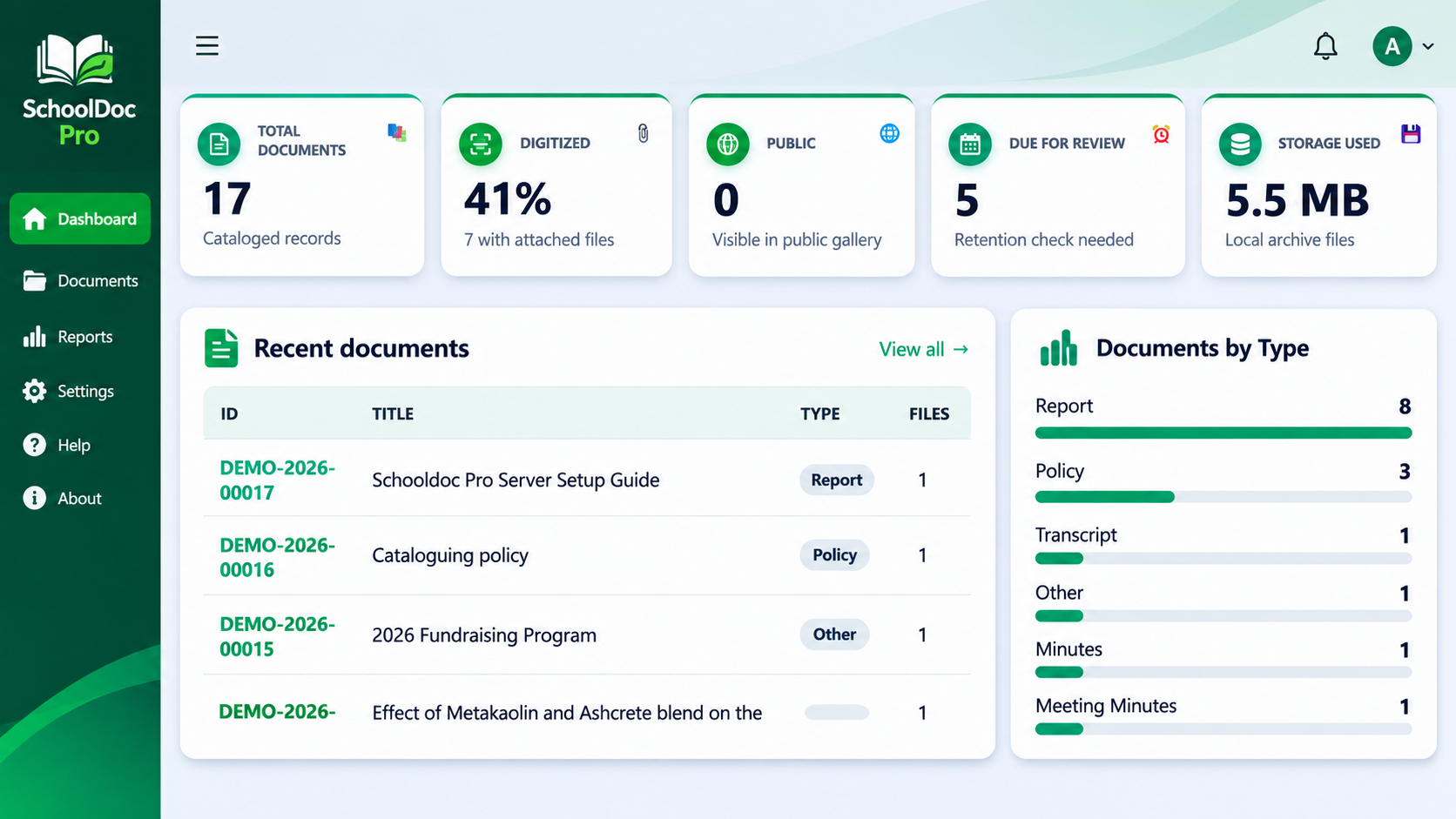

Questions schools ask first
It is a Windows desktop application available on the Microsoft Store. Once installed, it runs locally on your computer and opens in your browser. There is no school server to build and no monthly hosting bill.
No. The database and every uploaded file are stored in a folder on your computer. The only thing the app sends over the internet is your licence key, school code and app version, so we can confirm your licence is active. No document or student information is sent.
Only to install, activate your licence and run a quick background check every 12 hours. If the connection drops, the app keeps working for 7 days on the last successful check, so a bad week of internet does not stop your records office.
Install SchoolDoc Pro free from the Microsoft Store, then ask us for a trial code on WhatsApp or email. Enter the code on the activation screen and the full app opens. If you buy a school licence, your records stay right where they are.
A licence key belongs to one computer. If you need it on a second machine, or you are replacing a computer, message us and we will sort it out. Several staff accounts, each with its own role, can sign in on the computer where it is installed.
Put your school’s records in order this week
Get SchoolDoc Pro from the Microsoft Store, ask for a trial code and try it on your own documents. We are on WhatsApp if you want a guided start.